
The bottleneck isn't the model. It's what the model is allowed to return.
There's a moment every AI user hits. You ask your chatbot to help compare flight options. It returns four paragraphs. You ask it to pull up your last three invoices. You get a table in monospace. You ask it to help you pick a date for a meeting. It tells you to type one in.
The AI understood you. The problem isn't capability. It's the medium.
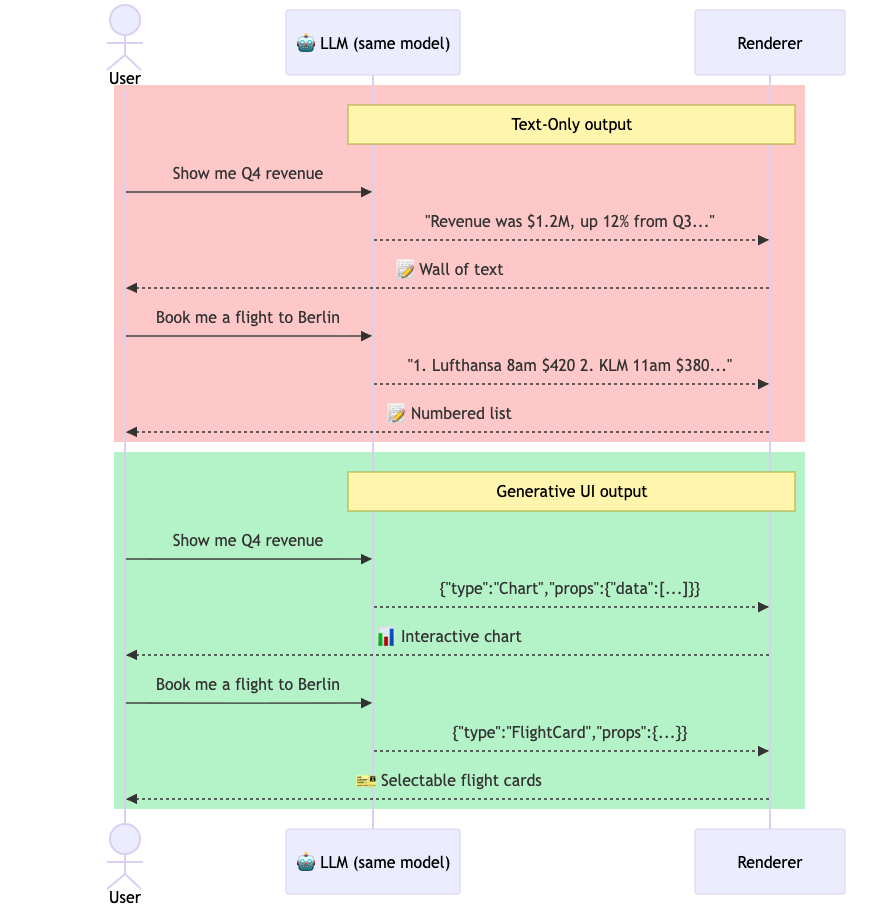
Every AI response — regardless of what the model actually knows — gets squeezed through text before it reaches you. A stock trend becomes a sentence about numbers. A booking confirmation becomes a list of fields. A date picker becomes a sentence that says please enter a date. Information that should be an interface becomes prose that describes one.
Text is a lossy medium for many things. When an AI knows the answer is a chart, but can only return a string, something gets lost in translation.
The assumption nobody questioned
The chatbot paradigm carried an assumption from the start: AI output = text. It was natural. Models generate tokens. Tokens are text. The UI for every major AI — ChatGPT, Claude, Gemini — is a text input and a text response, with some markdown bolting on tables and code blocks.
But the format of a response and the format of the underlying information aren't the same thing. A date isn't text. A chart isn't text. A form with validation logic isn't text. When you force these through a text channel, the interface layer becomes the bottleneck — not the model.
This limitation isn't fundamental to how AI works. It's an architectural decision. One that several teams have already started reversing.
What Generative UI actually is
Generative UI is the idea that AI responses should not be limited to text strings. Instead of returning "The weather in San Francisco is 62°F and foggy", the model returns a weather card — an actual rendered component with an icon, temperature, forecast strip, and a button that adds a reminder. The same information. A different output format.
The model doesn't write the component from scratch each time. That would be unsafe and unreliable. Instead, it works from a pre-built library: a catalog of components that developers have already designed, tested, and styled. The model's job is to choose which component is appropriate and supply the right data. The rendering is handled by your design system.
Think of it this way: when a human designer gets a content brief, they don't invent new visual elements from scratch. They pick from a design system — cards, buttons, tables, charts — and compose them. Generative UI gives the AI the same capability.
Where the field stands
Several approaches have shipped:
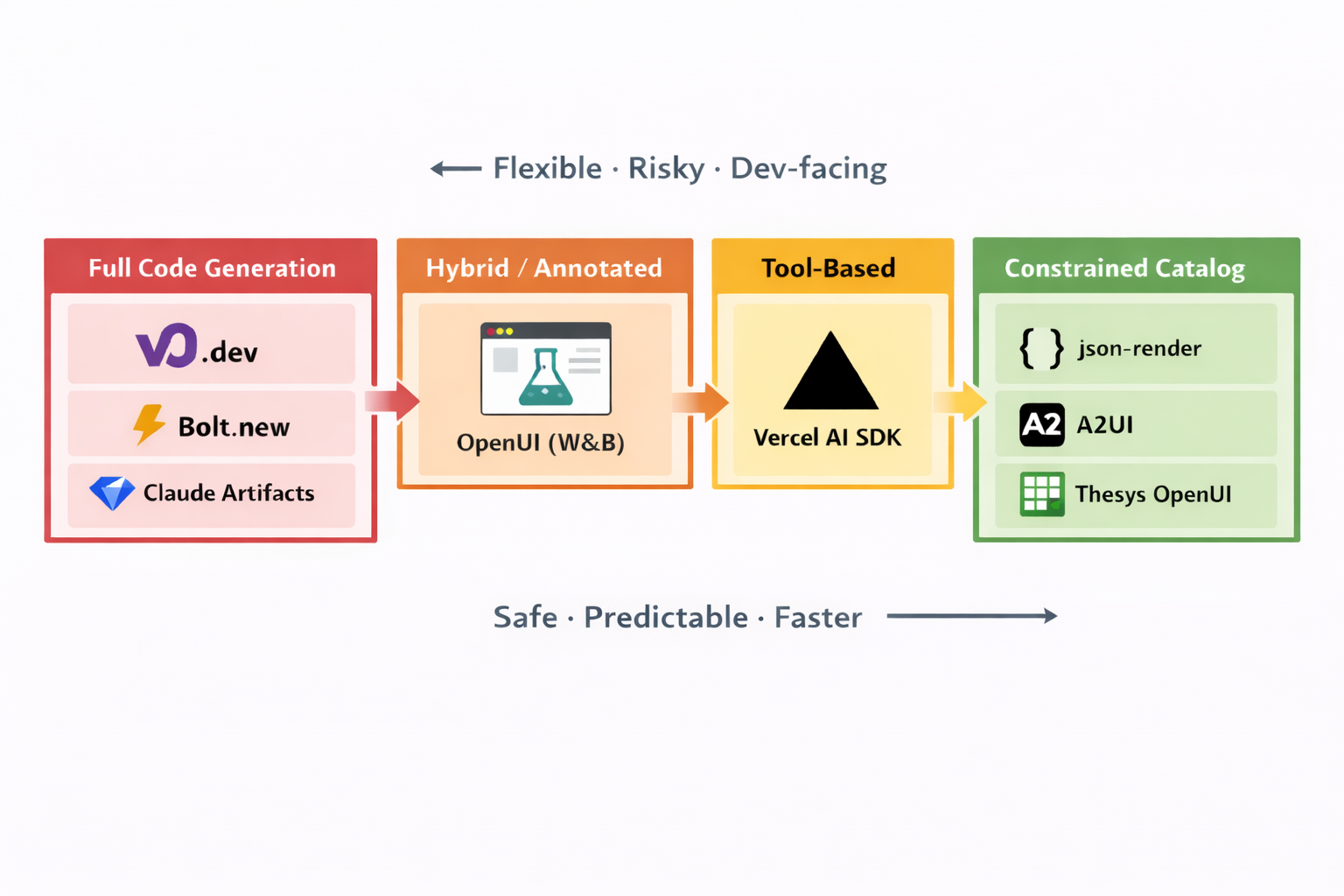
Code generation tools (v0.dev, Bolt.new, Claude Artifacts) give the model maximum freedom — it writes actual HTML or JSX, which gets evaluated and rendered. These are developer tools. They generate code for a human to review before it reaches users.
Tool-based approaches (Vercel AI SDK) let the model pick from predefined tool definitions, each mapping to a pre-built component. The AI doesn't write code; it makes function calls with structured parameters.
Constrained catalogs (json-render, Thesys OpenUI) go further — the model outputs a structured specification describing an entire interface, constrained to a validated component catalog. These are designed for production user-facing applications where the AI is assembling UI in real-time.
Cross-agent protocols (Google A2UI) treat UI description as a communication format between AI agents — a standard that any compatible client can render, regardless of which agent produced it.
Each approach makes a different bet on one central question: how much freedom should the model have? The further right you go on the spectrum — toward constrained catalogs — the safer and more reliable the output. The further left — toward code generation — the more expressive but harder to trust.
Why it matters now
The gap between what a model knows and what it can show you is getting harder to ignore. AI is being asked to do things that don't fit in a text box: book travel, manage expenses, build dashboards, coordinate calendars. The bottleneck isn't the model's understanding. It's the output channel.
The era of text-only AI responses is a temporary phase, not a permanent constraint. The question — and the more interesting engineering challenge — is how we build the architecture to support what comes next.
For the full technical picture of every approach, how they compare, and what to use when: Generative UI: A Complete Technical Map.